Vanguard Spoofer Rev 2 per Valorant
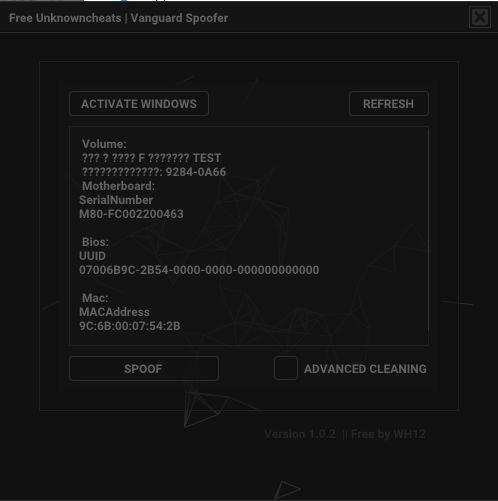
Vanguard Spoofer Rev 2: uno strumento per aggirare i divieti HWID in Valorant senza reinstallare Windows. Spoofing HWID e pulizia delle tracce di Riot Vanguard.
Piani e pagamento
Checkout opens at our payment partner Digiseller — a secure, well-known marketplace gateway. You receive the access key right after payment.
After purchase — what happens next
-
1
Pay via Digiseller
Pick a plan and complete checkout on our payment partner. Card, e-wallet and crypto are supported.
-
2
Get your key / file
A download link or activation key arrives instantly in your Digiseller account and by email.
-
3
Follow the bundled guide
Before launching, read the pre-use tips — they cover the recommended Windows / TPM steps.
-
4
Stuck? Ping support
Reach us on Telegram or via the in-page chat — we walk you through it.
FAQ — this product
A spoofer reduces the chance that the anti-cheat re-flags your machine. No product can guarantee 100% protection — follow the bundled tips (clean Windows install, TPM cleanup) for the best result.
Supported anti-cheats and games are listed in the "Compatibility" and "Works with games" sections above. If your game / AC is not listed, ping support before buying.
If the spoofer doesn't activate on your hardware, contact us within the period stated on the Guarantees page — we either help fix it, swap it for another product, or refund.
Highly recommended for a fresh start: it clears traces the anti-cheat may already remember. Full instructions are in the tips section.
Instant. After Digiseller confirms payment, you receive a file / key in your Digiseller account and by email.
Vanguard Spoofer Rev 2: uno spoofer HWID gratuito per Valorant, progettato per aggirare i divieti hardware imposti dall'anti-cheat di Riot Vanguard. Lo strumento modifica gli identificatori chiave del computer, consentendo al sistema di protezione di riconoscere il dispositivo come nuovo.
Lo spoofer non richiede la reinstallazione di Windows ed è una soluzione completa che combina spoofing HWID, pulizia della traccia del gioco e modifica dei parametri di rete. Viene utilizzato una volta e non è installato in modo permanente nel sistema.
Modifica i seguenti dati:
- Numero di serie della scheda madre
-UUID del BIOS
- Indirizzo MAC dell'adattatore di rete
- Numeri di serie HDD e SSD
- Identificatori hardware di Windows
- Valori di registro
Funzionalità aggiuntive:
- Pulitore di tracce Valorant integrato
- Pulizia dei file e del registro di Riot Games
- Interfaccia grafica intuitiva
- Compatibile con la maggior parte delle schede madri
Come funziona:
- Falsifica gli identificatori hardware del sistema
- Vanguard registra i nuovi dati come un computer unico
- Il divieto di HWID non è più efficace
- Usato una volta, senza installazione permanente
Importante:
- Lo spoofer gratuito viene fornito senza supporto tecnico
- Lo strumento è stato testato e può aiutare, ma non garantisce risultati
- Utilizzare a proprio rischio
- Lo stato non rilevato non garantisce la protezione dai divieti
- L'utente è responsabile di ulteriori azioni
Compatibilità:
Schede madri problematiche:
-ASUS
-ASROCK
-ACER
Soluzione:
- Disabilitare Secure Flash nel BIOS
Ulteriori:
- Per Lenovo, si consiglia di utilizzare U1-Tool
- Per Insyde BIOS, si consiglia l'utilità H2OSDE
- Controllare il tipo di BIOS prima di iniziare
Preparazione:
- Disabilita l'antivirus
- Chiudi completamente Valorant e Riot Client
- Esegui il programma come amministratore
Istruzioni per l'uso:
1. Fai clic su "Attiva Windows" e attendi il completamento
2. Fare clic su "Aggiorna" per visualizzare gli identificatori correnti
3. Abilita l'opzione "Pulizia avanzata".
4. Fare clic su "Spoof" per generare nuovi HWID
5. Verificare che i valori siano stati modificati correttamente
6. Esegui il pulitore Valorant integrato
7. Controlla AppData e la pulizia del registro
8. Riavviare il computer
9. Facoltativamente aggiornare il BIOS come consigliato dallo sviluppatore
10. Eseguire un altro riavvio
11. Installa Valorant e crea un nuovo account
Domande frequenti:
Come verificare l'efficacia dello spoofer:
- Crea un nuovo account
- Gioca a diverse sessioni di gioco
- Nessun ban immediato indica il successo
Puoi essere bannato:
- Vanguard registra solo gli identificatori
- Ripetute violazioni delle regole possono portare ad un nuovo ban
Come disinstallare lo spoofer:
- Dopo l'uso eliminare i file del programma
Perché lo spoofer non funziona:
- Secure Flash è attivo
- Le istruzioni non sono state seguite correttamente
- Il sistema non è stato ripulito dalle tracce di Valorant
Requisiti di sistema:
Sistema operativo:
Windows 10 x64: consigliato 22H2
Windows11x64
Processore:
Intel
AMD
Anti-cheat supportati:
- Avanguardia antisommossa
Risultato:
Vanguard Spoofer Rev 2 ti consente di modificare gli identificatori hardware e bypassare i divieti HWID in Valorant senza reinstallare Windows. La massima efficacia si ottiene seguendo rigorosamente le istruzioni e utilizzando lo strumento in modo responsabile.