PlayerUnknown's Battlegrounds (PUBG) の HWID スプーファー
PlayerUnknown's Battlegrounds のプライベート HWID スプーファー。 BattlEye HWID 禁止の一時的なバイパス、現在の PUBG バージョンのサポート、PC が再起動されるまで有効です。
プランとお支払い
Checkout opens at our payment partner Digiseller — a secure, well-known marketplace gateway. You receive the access key right after payment.
After purchase — what happens next
-
1
Pay via Digiseller
Pick a plan and complete checkout on our payment partner. Card, e-wallet and crypto are supported.
-
2
Get your key / file
A download link or activation key arrives instantly in your Digiseller account and by email.
-
3
Follow the bundled guide
Before launching, read the pre-use tips — they cover the recommended Windows / TPM steps.
-
4
Stuck? Ping support
Reach us on Telegram or via the in-page chat — we walk you through it.
FAQ — this product
A spoofer reduces the chance that the anti-cheat re-flags your machine. No product can guarantee 100% protection — follow the bundled tips (clean Windows install, TPM cleanup) for the best result.
Supported anti-cheats and games are listed in the "Compatibility" and "Works with games" sections above. If your game / AC is not listed, ping support before buying.
If the spoofer doesn't activate on your hardware, contact us within the period stated on the Guarantees page — we either help fix it, swap it for another product, or refund.
Highly recommended for a fresh start: it clears traces the anti-cheat may already remember. Full instructions are in the tips section.
Instant. After Digiseller confirms payment, you receive a file / key in your Digiseller account and by email.
この HWID Spoofer は、バトル ロイヤルの PlayerUnknown's Battlegrounds 用に特別に開発されました。製品の作成者はゲームの変更を常に監視し、ソフトウェアを迅速に更新および保守し、チート対策の変更が発生した場合には必要な調整を行います。
スプーファーの主な目的は、ハードドライブ上のハードウェア禁止を回避することです。 PUBG では、このような禁止は通常、新しいアカウントに対して最大 24 時間の一時的な禁止をもたらします。
仕組み:
- 一時的な HWID スプーフィング
- コンピューターからのみ禁止を解除します
- ゲームアカウントの禁止は解除されません
- すべての変更は PC を再起動するまで有効のままです
- 次回再起動するまで、一度だけ起動する必要があります
重要な注意事項:
- スプーファーはアカウントの禁止を解除しません
- 使用はユーザー自身の責任で行われます
- 未検出ステータスは禁止からの保護を保証するものではありません
- PUBGのアップデート後、スプーファーのアップデートを待つ必要があります
- ソフトウェアが検出された場合、またはプロジェクトが閉じられた場合、返金はできません
- アカウント停止に対する返金は行われません
- 別の製品へのキー交換はできません
追加の推奨事項:
- チートで正しく動作させるには:
- 最初にチートを起動します
- 次にスプーファーを起動します
- その後、ゲームを起動します
- 新しいアカウントで使用する前に、次のことをお勧めします。
- 新しい Windows ユーザーを作成する
- システムのプロパティでコンピュータ名を変更します (禁止が続く場合)
セキュリティに関する推奨事項:
- 起動する前に、ゲームとランチャーが閉じていることを確認してください
- 他のチートが以前に使用されていた場合 - PC を再起動します
- ゲームを開始する前にソフトウェアランチャーを閉じてください
使用方法:
1.ランチャーを開きます
2.ランチャーに登録する
3. キーをアクティブ化します
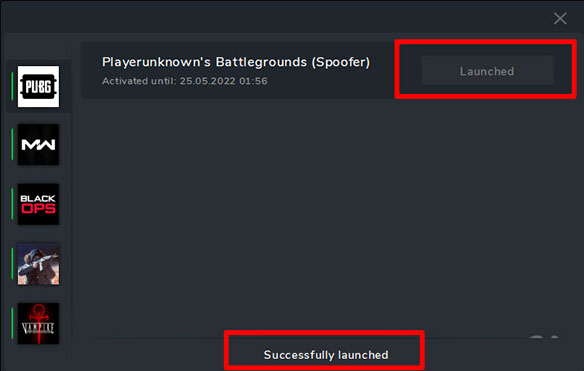
4.「PUBG用Spoofer」を選択し、「起動」をクリックします。
5.「正常に起動されました」ステータスが表示されるまで待ちます。
6. ランチャーを閉じる
7. ゲームを起動します
ランチャーと手順は oplata.info で入手できます。お支払い後、追加情報とダウンロード リンクが電子メールに送信されます。
システム要件:
オペレーティングシステム:
Windows 10 x64: 1903 / 1909 / 2004 / 20H2 / 21H1 / 21H2
Windows 11 x64: 21H2 / 22H2 / 23H2 / 24H2 / 25H2
プロセッサ:
インテル
AMD
サポートされているアンチチート:
- バトルアイ (BE)
結果:
HWID Spoofer for PUBG を使用すると、BattlEye HWID 禁止を一時的に回避し、次回コンピューターが再起動されるまでゲームへのアクセスを取り戻すことができます。指示と推奨事項を厳守することで、最大の結果が得られます。