Dota 2 用 Melonity HWID スプーファー
Valve トレースの自動クリーンアップを備えた Dota 2 用の無料 HWID Spoofer Melonity。 Steam と Dota 2 のトレースをクリアし、VAC HWID 禁止を回避します。
プランとお支払い
Checkout opens at our payment partner Digiseller — a secure, well-known marketplace gateway. You receive the access key right after payment.
After purchase — what happens next
-
1
Pay via Digiseller
Pick a plan and complete checkout on our payment partner. Card, e-wallet and crypto are supported.
-
2
Get your key / file
A download link or activation key arrives instantly in your Digiseller account and by email.
-
3
Follow the bundled guide
Before launching, read the pre-use tips — they cover the recommended Windows / TPM steps.
-
4
Stuck? Ping support
Reach us on Telegram or via the in-page chat — we walk you through it.
FAQ — this product
A spoofer reduces the chance that the anti-cheat re-flags your machine. No product can guarantee 100% protection — follow the bundled tips (clean Windows install, TPM cleanup) for the best result.
Supported anti-cheats and games are listed in the "Compatibility" and "Works with games" sections above. If your game / AC is not listed, ping support before buying.
If the spoofer doesn't activate on your hardware, contact us within the period stated on the Guarantees page — we either help fix it, swap it for another product, or refund.
Highly recommended for a fresh start: it clears traces the anti-cheat may already remember. Full instructions are in the tips section.
Instant. After Digiseller confirms payment, you receive a file / key in your Digiseller account and by email.
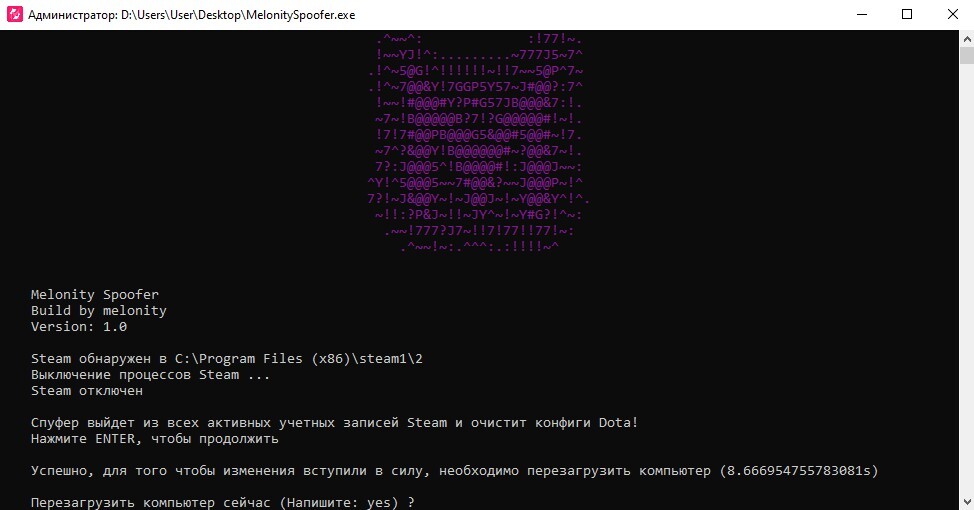
Melonity HWID Spoofer は、ハードウェアの禁止を回避し、Valve によって残された痕跡を自動的にクリーンアップするように設計された、Dota 2 プレーヤー向けの無料の人気ツールです。このプログラムはコンピュータのハードウェア データを変更し、以前の Steam および Dota 2 アカウントからのシステムの痕跡を消去します。
スプーファーは Melonity チームによって開発され、白紙の状態でゲームを始めたいユーザーを対象としています。製品は無料で配布されており、複雑な設定は必要ありません。
次のデータを変更します。
- コンピュータのハードウェア識別子
- 蒸気とバルブのトレース
- Steamアカウントのキャッシュ
- Dota 2設定ファイル
追加機能:
- バルブトレースの自動クリーンアップ
- 以前の Steam アカウント追跡のクリーンアップ
- Steamフォルダーの自動検出
- ゲームに再参加するためのシステムの準備
仕組み:
- バルブと蒸気の痕跡のクリーンアップ
- コンピュータハードウェアデータのなりすまし
- 新しいアカウントのためのシステム準備
- 変更を適用してから PC を再起動する
重要:
- スプーファーは無料で配布されています
- 使用はユーザー自身の責任で行われます
- スプーファーはアカウントの禁止を解除しません
- プレイするには新しいまたはクリーンな Steam アカウントが必要です
- 新しいアカウントの場合は、IP アドレスの変更をお勧めします
使用方法:
1. スプーファーを使用してアーカイブをダウンロードします
2. C または D ドライブのルート フォルダーに解凍します。
(ファイルパスには非ラテン文字を含めることはできません)
3. 管理者としてプログラムを実行します
4. Steam キャッシュからの設定とアカウントの削除を確認します
5. クリーンアップが完了するまで待ちます
6. コンピュータを再起動します
7. Steamを起動する
8. ポップアップウィンドウで、「復元」をクリックし、「サービスのインストール」をクリックします。
9. Steam アカウントにログインします
10. Dota 2 プロパティ → ローカル ファイル → 整合性の確認に移動します
11. チートなしでゲームを起動し、メニューにロードして終了します。
12. 以降の起動はチートで可能
システム要件:
オペレーティングシステム:
Windows 10 x64
Windows 11 x64
プロセッサ:
インテル
AMD
サポートされているアンチチート:
- バルブアンチチート (VAC)
結果:
Melonity HWID Spoofer を使用すると、システムの Valve トレースをクリーンアップし、コンピューターで新しい Steam アカウントを準備し、ハードウェアの制限なしに Dota 2 のプレイを続けることができます。指示を厳守することで最大の結果が得られます。