适用于绝地求生 (PUBG) 的 HWID 欺骗程序
《绝地求生》的私人 HWID 欺骗器。暂时绕过 BattlEye HWID 禁令,支持当前的 PUBG 版本,在 PC 重新启动之前一直有效。
套餐与支付
Checkout opens at our payment partner Digiseller — a secure, well-known marketplace gateway. You receive the access key right after payment.
After purchase — what happens next
-
1
Pay via Digiseller
Pick a plan and complete checkout on our payment partner. Card, e-wallet and crypto are supported.
-
2
Get your key / file
A download link or activation key arrives instantly in your Digiseller account and by email.
-
3
Follow the bundled guide
Before launching, read the pre-use tips — they cover the recommended Windows / TPM steps.
-
4
Stuck? Ping support
Reach us on Telegram or via the in-page chat — we walk you through it.
FAQ — this product
A spoofer reduces the chance that the anti-cheat re-flags your machine. No product can guarantee 100% protection — follow the bundled tips (clean Windows install, TPM cleanup) for the best result.
Supported anti-cheats and games are listed in the "Compatibility" and "Works with games" sections above. If your game / AC is not listed, ping support before buying.
If the spoofer doesn't activate on your hardware, contact us within the period stated on the Guarantees page — we either help fix it, swap it for another product, or refund.
Highly recommended for a fresh start: it clears traces the anti-cheat may already remember. Full instructions are in the tips section.
Instant. After Digiseller confirms payment, you receive a file / key in your Digiseller account and by email.
这款 HWID Spoofer 专为绝地求生大逃杀游戏而开发。产品创作者不断监控游戏的变化,及时更新和维护软件,并在防作弊发生变化时做出必要的调整。
欺骗程序的主要目的是绕过硬盘上的硬件禁令。在 PUBG 中,此类禁令最常见的结果是新帐户被临时禁止长达 24 小时。
工作原理:
- 临时 HWID 欺骗
- 仅删除计算机的禁令
- 不会解除游戏帐户的禁令
- 在电脑重新启动之前,所有更改均保持有效
- 只需启动一次,直到下次重新启动
重要提示:
- 欺骗者不会删除帐户禁令
- 用户自行承担使用风险
- 未检测到的状态并不能保证免受禁令的影响
- PUBG更新后,必须等待spoofer更新
- 如果检测到软件或项目被关闭,则无法退款
- 账户被封禁不予退款
- 无法将密钥交换为其他产品
附加建议:
- 为了正确操作作弊:
- 首先启动作弊程序
- 然后启动欺骗程序
- 然后启动游戏
- 在新帐户上使用之前,建议:
- 创建一个新的Windows用户
- 更改系统属性中的计算机名称(如果禁令仍然存在)
安全建议:
- 启动之前,请确保游戏和启动器已关闭
- 如果之前使用过其他作弊方式 - 重新启动电脑
- 开始游戏前关闭软件启动器
使用说明:
1. 打开启动器
2. 在启动器中注册
3. 激活密钥
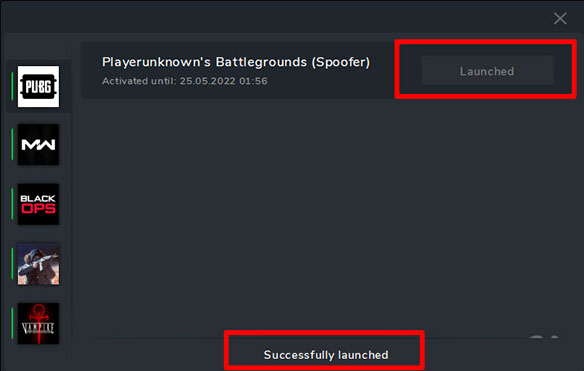
4. 选择 PUBG 的 Spoofer,然后单击启动
5.等待“启动成功”状态
6. 关闭启动器
7.启动游戏
启动器和说明可在 oplata.info 上找到。付款后,附加信息和下载链接将发送到您的电子邮件。
系统要求:
操作系统:
Windows 10 x64:1903 / 1909 / 2004 / 20H2 / 21H1 / 21H2
Windows 11 x64:21H2 / 22H2 / 23H2 / 24H2 / 25H2
处理器:
英特尔
AMD
支持的反作弊:
- BattlEye(比利时)
结果:
PUBG 的 HWID Spoofer 允许您暂时绕过 BattlEye HWID 禁令并重新获得游戏访问权限,直到下一次计算机重新启动。严格遵守说明和建议才能获得最大结果。