《Valorant》Vanguard Spoofer Rev 2
Vanguard Spoofer Rev 2 — 一款无需重新安装 Windows 即可绕过 Valorant 中 HWID 禁令的工具。 HWID 欺骗和 Riot Vanguard 痕迹清理。
套餐与支付
Checkout opens at our payment partner Digiseller — a secure, well-known marketplace gateway. You receive the access key right after payment.
After purchase — what happens next
-
1
Pay via Digiseller
Pick a plan and complete checkout on our payment partner. Card, e-wallet and crypto are supported.
-
2
Get your key / file
A download link or activation key arrives instantly in your Digiseller account and by email.
-
3
Follow the bundled guide
Before launching, read the pre-use tips — they cover the recommended Windows / TPM steps.
-
4
Stuck? Ping support
Reach us on Telegram or via the in-page chat — we walk you through it.
FAQ — this product
A spoofer reduces the chance that the anti-cheat re-flags your machine. No product can guarantee 100% protection — follow the bundled tips (clean Windows install, TPM cleanup) for the best result.
Supported anti-cheats and games are listed in the "Compatibility" and "Works with games" sections above. If your game / AC is not listed, ping support before buying.
If the spoofer doesn't activate on your hardware, contact us within the period stated on the Guarantees page — we either help fix it, swap it for another product, or refund.
Highly recommended for a fresh start: it clears traces the anti-cheat may already remember. Full instructions are in the tips section.
Instant. After Digiseller confirms payment, you receive a file / key in your Digiseller account and by email.
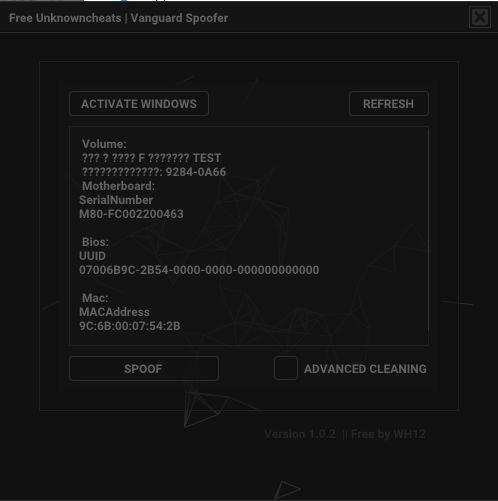
Vanguard Spoofer Rev 2 — 一款适用于《Valorant》的免费 HWID 欺骗程序,旨在绕过 Riot Vanguard 反作弊所施加的硬件禁令。该工具修改关键计算机标识符,使保护系统能够将该设备识别为新设备。
该欺骗程序不需要重新安装Windows,是一个结合了HWID欺骗、游戏痕迹清理和网络参数修改的综合解决方案。它仅使用一次,不会永久安装在系统上。
修改以下数据:
- 主板序列号
- BIOS UUID
- 网络适配器MAC地址
- HDD 和 SSD 序列号
- Windows 硬件标识符
- 注册表值
附加功能:
- 内置 Valorant 痕迹清理器
- Riot Games 文件和注册表清理
- 用户友好的图形界面
- 与大多数主板兼容
工作原理:
- 欺骗系统硬件标识符
- Vanguard 将新数据注册为唯一的计算机
- HWID 禁令不再有效
- 使用一次,无需永久安装
重要:
- 免费提供欺骗程序,无需技术支持
- 该工具已经过测试,可能有帮助,但不保证结果
- 使用时需自行承担风险
- 未检测到的状态并不能保证免受禁令的影响
- 用户对进一步的行为承担责任
兼容性:
有问题的主板:
- 华硕
- 华擎
- 宏碁
解决方案:
- 在 BIOS 中禁用安全闪存
附加:
- 对于联想,推荐使用U1-Tool
- 对于 Insyde BIOS,推荐使用 H2OSDE 实用程序
- 启动前检查BIOS类型
准备工作:
- 禁用防病毒软件
- 完全关闭Valorant和Riot客户端
- 以管理员身份运行程序
使用说明:
1.点击“激活Windows”并等待完成
2. 点击“刷新”显示当前标识符
3.启用“高级清洁”选项
4. 点击“Spoof”生成新的HWID
5. 验证值是否已正确更改
6.运行内置的Valorant清理器
7.检查AppData和注册表清理
8. 重新启动计算机
9. 根据开发人员的建议选择更新 BIOS
10.再次执行重启
11.安装Valorant并创建一个新帐户
常见问题解答:
如何检查欺骗程序的有效性:
- 创建一个新帐户
- 玩几个游戏
- 没有立即禁止就表示成功
你会被禁止吗:
- Vanguard仅记录标识符
- 多次违反规则可能会导致新的禁令
如何卸载欺骗程序:
- 使用后,删除程序文件
为什么欺骗器不工作:
- 安全闪存处于活动状态
- 未正确遵循说明
- 系统未清除 Valorant 痕迹
系统要求:
操作系统:
Windows 10 x64:推荐 22H2
Windows 11 x64
处理器:
英特尔
AMD
支持的反作弊:
- 防暴先锋
结果:
Vanguard Spoofer Rev 2 允许您更改硬件标识符并绕过 Valorant 中的 HWID 禁令,而无需重新安装 Windows。通过严格遵循说明并负责任地使用该工具,可以实现最大效率。