BattlEye Games 的未知 HWID 欺骗程序
未知的 HWID 欺骗程序 — 用于使用 BattlEye 和 Easy Anti-Cheat 的游戏的私人临时 HWID 欺骗程序。使用三年多,定期更新、系统清理和欺骗,无需重装Windows。
套餐与支付
Checkout opens at our payment partner Digiseller — a secure, well-known marketplace gateway. You receive the access key right after payment.
After purchase — what happens next
-
1
Pay via Digiseller
Pick a plan and complete checkout on our payment partner. Card, e-wallet and crypto are supported.
-
2
Get your key / file
A download link or activation key arrives instantly in your Digiseller account and by email.
-
3
Follow the bundled guide
Before launching, read the pre-use tips — they cover the recommended Windows / TPM steps.
-
4
Stuck? Ping support
Reach us on Telegram or via the in-page chat — we walk you through it.
FAQ — this product
A spoofer reduces the chance that the anti-cheat re-flags your machine. No product can guarantee 100% protection — follow the bundled tips (clean Windows install, TPM cleanup) for the best result.
Supported anti-cheats and games are listed in the "Compatibility" and "Works with games" sections above. If your game / AC is not listed, ping support before buying.
If the spoofer doesn't activate on your hardware, contact us within the period stated on the Guarantees page — we either help fix it, swap it for another product, or refund.
Highly recommended for a fresh start: it clears traces the anti-cheat may already remember. Full instructions are in the tips section.
Instant. After Digiseller confirms payment, you receive a file / key in your Digiseller account and by email.
未知的 HWID Spoofer — 一种专用工具,专注于清除系统中的禁令痕迹和欺骗硬件标识符。该软件已使用三年多,持续更新,甚至可以处理复杂的 HWID 禁令案例。
该程序允许您清除作弊和反作弊的痕迹,而无需强制重新安装 Windows 或游戏,但始终建议完全重新安装作为最可靠的选择。
终身激活意味着只要开发者维护和更新产品,程序就可以使用。截至撰写本文时,该欺骗程序已运行三年多,并定期收到更新。
支持的反作弊:
- BattlEye(比利时)
- 简易反作弊 (EAC)
欺骗程序应该适用于所有具有 BE 和 EAC 的游戏,但建议事先检查特定游戏的当前状态。
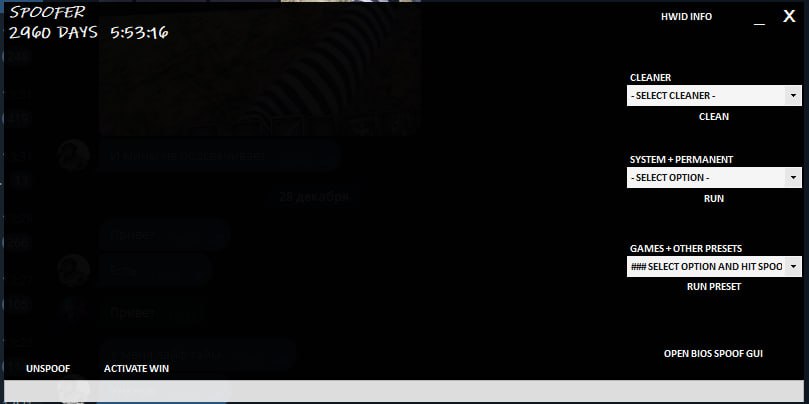
该计划有四个主要部分。
特点:
- 清洁剂——用于在收到禁令后清除痕迹。不适合常规使用
- 系统 + 永久 — 用于永久更改计算机数据的部分
- 游戏 + 其他预设 — 绕过 HWID 禁令的主要部分
清洁工
用于清除收到禁令后的痕迹。不适合常规使用。
功能:
- Deep Cleaner — 深层清洁
- 一般清洁剂 — 基本清洁
- 驱动清洁剂
- 蒸汽清洁机
- 苹果清洁剂
- Fortnite / Apex / COD / EFT / FiveM / PUBG 的清洁
- 设备重装:网络、显示器、鼠标、键盘、USB、音频等(一键批量应用)
系统+永久
用于永久更改计算机数据的部分。
重要提示:重新启动后更改不会恢复。
推荐:
- 创建 Windows 还原点
- 准备一个可启动的Windows USB驱动器
功能:
- 更改 BIOS 值(不推荐 — 最好手动更新 BIOS)
- 用户SID
- 计算机名称
- 卷 ID
- 欺骗注册表
- 欺骗MAC(可能会导致网络丢失——提前保存驱动程序)
游戏+其他预设
绕过 HWID 禁令的主要部分。
- 选择特定游戏 → RUN 预设
- 如果游戏未列出 - 选择反作弊(最常见的是 BE)
- 启动欺骗驱动程序
- 有一个具有实验性功能的测试部分
附加:
- UNSPOOF — 将数据恢复到应用欺骗之前的状态
- HWID INFO — 查看当前系统数据
- 打开 BIOS 欺骗 GUI — 不推荐使用
- 激活 Windows — 此功能尚未经过测试
重要提示:
- 某些参数(MAC、BIOS、卷、注册表)是不可逆的
- 始终创建还原点
- 提供了 Unspoof 按钮,但不能取代系统备份
- 程序内提供详细说明(帮助按钮)
系统要求:
操作系统:
Windows 10; Windows 11;
处理器:英特尔; AMD;
结果:
Unknown HWID Spoofer 允许您按照说明和安全预防措施清除系统中的禁令痕迹、更改硬件标识符以及使用 BattlEye 反作弊重新获得游戏访问权限。