Unknown HWID Spoofer for BattlEye Games
Unknown HWID Spoofer — a private temporary HWID spoofer for games with BattlEye and Easy Anti-Cheat. In use for over three years, regularly updated, system cleanup and spoofing without reinstalling Windows.
Plans & Payment
Checkout opens at our payment partner Digiseller — a secure, well-known marketplace gateway. You receive the access key right after payment.
After purchase — what happens next
-
1
Pay via Digiseller
Pick a plan and complete checkout on our payment partner. Card, e-wallet and crypto are supported.
-
2
Get your key / file
A download link or activation key arrives instantly in your Digiseller account and by email.
-
3
Follow the bundled guide
Before launching, read the pre-use tips — they cover the recommended Windows / TPM steps.
-
4
Stuck? Ping support
Reach us on Telegram or via the in-page chat — we walk you through it.
FAQ — this product
A spoofer reduces the chance that the anti-cheat re-flags your machine. No product can guarantee 100% protection — follow the bundled tips (clean Windows install, TPM cleanup) for the best result.
Supported anti-cheats and games are listed in the "Compatibility" and "Works with games" sections above. If your game / AC is not listed, ping support before buying.
If the spoofer doesn't activate on your hardware, contact us within the period stated on the Guarantees page — we either help fix it, swap it for another product, or refund.
Highly recommended for a fresh start: it clears traces the anti-cheat may already remember. Full instructions are in the tips section.
Instant. After Digiseller confirms payment, you receive a file / key in your Digiseller account and by email.
Unknown HWID Spoofer — a private tool focused on cleaning the system from ban traces and spoofing hardware identifiers. The software has been in use for over three years, is consistently updated, and handles even complex HWID ban cases.
The program allows you to clean traces of cheats and anti-cheats without a mandatory Windows or game reinstall, although a full reinstall is always recommended as the most reliable option.
LifeTime activation means the program can be used as long as the developer maintains and updates the product. At the time of writing, the spoofer has been working for over three years and receives regular updates.
Supported anti-cheats:
- BattlEye (BE)
- Easy Anti-Cheat (EAC)
The spoofer should work in all games with BE and EAC, however it is recommended to check the current status for the specific game beforehand.
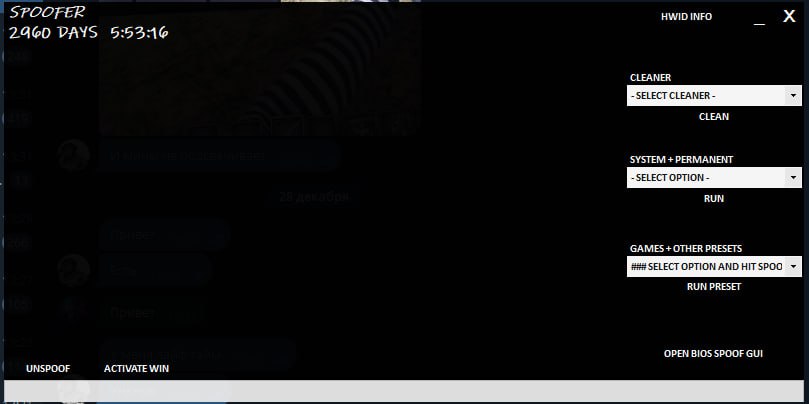
The program has four main sections.
Features:
- Cleaner — used to clean traces after receiving a ban. Not intended for regular use
- System + Permanent — section for permanently changing computer data
- Games + Other Presets — main section for bypassing HWID bans
Cleaner
Used to clean traces after receiving a ban. Not intended for regular use.
Functionality:
- Deep Cleaner — deep cleaning
- General Cleaner — basic cleaning
- Driver Cleaner
- Steam Cleaner
- Apple Cleaner
- Cleaning for Fortnite / Apex / COD / EFT / FiveM / PUBG
- Device reinstallation: network, monitor, mouse, keyboard, USB, audio, and others (batch application with one button)
System + Permanent
Section for permanently changing computer data.
Important: changes are not reverted after a reboot.
Recommended:
- Create a Windows restore point
- Prepare a bootable Windows USB drive
Functionality:
- Change BIOS Values (not recommended — better to update BIOS manually)
- User SID
- Computer Name
- Volume IDs
- Spoof Registry
- Spoof MAC (may cause internet loss — save drivers in advance)
Games + Other Presets
Main section for bypassing HWID bans.
- Select a specific game → RUN Preset
- If the game is not listed — select the anti-cheat (most commonly BE)
- Launch the spoofing driver
- There is a test section with experimental features
Additional:
- UNSPOOF — revert data to the state before applying the spoofer
- HWID INFO — view current system data
- Open BIOS Spoof GUI — not recommended for use
- Activate Windows — this feature has not been tested
Important notes:
- Some parameters (MAC, BIOS, Volumes, Registry) are irreversible
- Always create a restore point
- The Unspoof button is provided but does not replace a system backup
- Detailed instructions are available inside the program (Help button)
System requirements:
Operating system:
Windows 10; Windows 11;
Processors: Intel; AMD;
Result:
Unknown HWID Spoofer allows you to clean the system from ban traces, change hardware identifiers, and regain access to games with BattlEye anti-cheat when following the instructions and safety precautions.