Melonity HWID Spoofer for Dota 2
Free HWID Spoofer Melonity for Dota 2 with automatic Valve trace cleanup. Clears Steam and Dota 2 traces, bypasses VAC HWID bans.
Plans & Payment
Checkout opens at our payment partner Digiseller — a secure, well-known marketplace gateway. You receive the access key right after payment.
After purchase — what happens next
-
1
Pay via Digiseller
Pick a plan and complete checkout on our payment partner. Card, e-wallet and crypto are supported.
-
2
Get your key / file
A download link or activation key arrives instantly in your Digiseller account and by email.
-
3
Follow the bundled guide
Before launching, read the pre-use tips — they cover the recommended Windows / TPM steps.
-
4
Stuck? Ping support
Reach us on Telegram or via the in-page chat — we walk you through it.
FAQ — this product
A spoofer reduces the chance that the anti-cheat re-flags your machine. No product can guarantee 100% protection — follow the bundled tips (clean Windows install, TPM cleanup) for the best result.
Supported anti-cheats and games are listed in the "Compatibility" and "Works with games" sections above. If your game / AC is not listed, ping support before buying.
If the spoofer doesn't activate on your hardware, contact us within the period stated on the Guarantees page — we either help fix it, swap it for another product, or refund.
Highly recommended for a fresh start: it clears traces the anti-cheat may already remember. Full instructions are in the tips section.
Instant. After Digiseller confirms payment, you receive a file / key in your Digiseller account and by email.
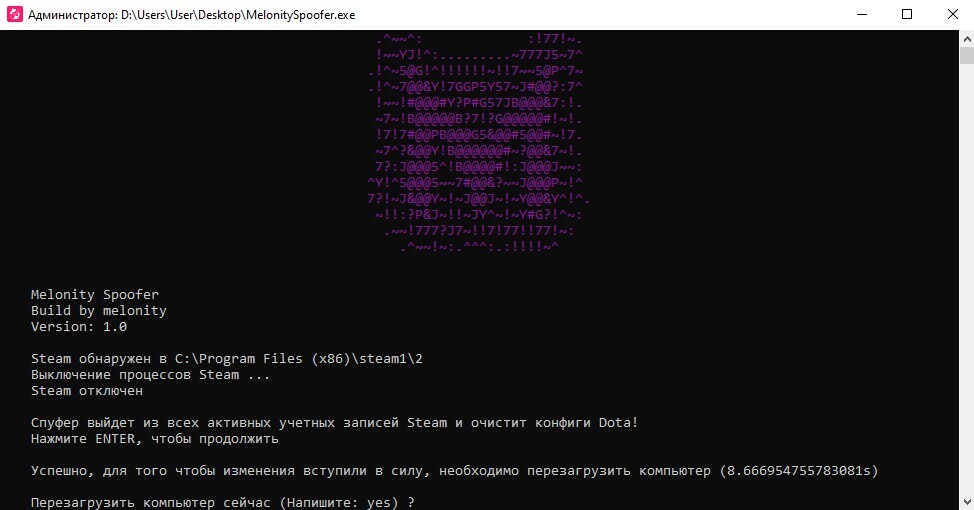
Melonity HWID Spoofer is a free and popular tool for Dota 2 players designed to bypass hardware bans and automatically clean up traces left by Valve. The program changes the computer's hardware data and cleans the system of traces from previous Steam and Dota 2 accounts.
The spoofer is developed by the Melonity team and is aimed at users who want to start the game with a clean slate. The product is distributed for free and does not require complex setup.
Changes the following data:
- Computer hardware identifiers
- Steam and Valve traces
- Steam account cache
- Dota 2 configuration files
Additional functionality:
- Automatic Valve trace cleanup
- Cleanup of previous Steam account traces
- Automatic Steam folder detection
- System preparation for re-entering the game
How it works:
- Cleanup of Valve and Steam traces
- Computer hardware data spoofing
- System preparation for a new account
- Applying changes followed by PC restart
Important:
- The spoofer is distributed for free
- Use is at the user's own risk
- The spoofer does not remove account bans
- A new or clean Steam account is required to play
- For new accounts, an IP address change is recommended
Usage instructions:
1. Download the archive with the spoofer
2. Extract to the root folder of drive C or D
(the file path must not contain non-Latin characters)
3. Run the program as administrator
4. Confirm deletion of configs and accounts from Steam cache
5. Wait for the cleanup to complete
6. Restart the computer
7. Launch Steam
8. In the pop-up windows, click "Restore", then "Install Service"
9. Log into your Steam account
10. Go to Dota 2 properties → local files → verify integrity
11. Launch the game without cheats, load into the menu and exit
12. Subsequent launches can be done with cheats
System requirements:
Operating system:
Windows 10 x64
Windows 11 x64
Processor:
Intel
AMD
Supported anti-cheats:
- Valve Anti-Cheat (VAC)
Result:
Melonity HWID Spoofer allows you to clean the system of Valve traces, prepare the computer for a new Steam account, and continue playing Dota 2 without hardware restrictions. Maximum results are achieved with strict adherence to the instructions.